
Learn · Everyday know-how · Lesson 3 of 6
Work faster with keyboard shortcuts
You willUse the keys for search, undo, the drawing tools, workspaces, drafting and walking in 3D.
Time2 min
Why it mattersA few keys save hundreds of clicks on a day of drawing, and the full list is always one key away.
Try it in Plotlay → Opens Plotlay with this lesson beside it. Nothing to install.
Steps
- Press ? or choose Help (the question mark in the top bar), type shortcut, and choose any shortcut in the list for the full Keyboard shortcuts table.
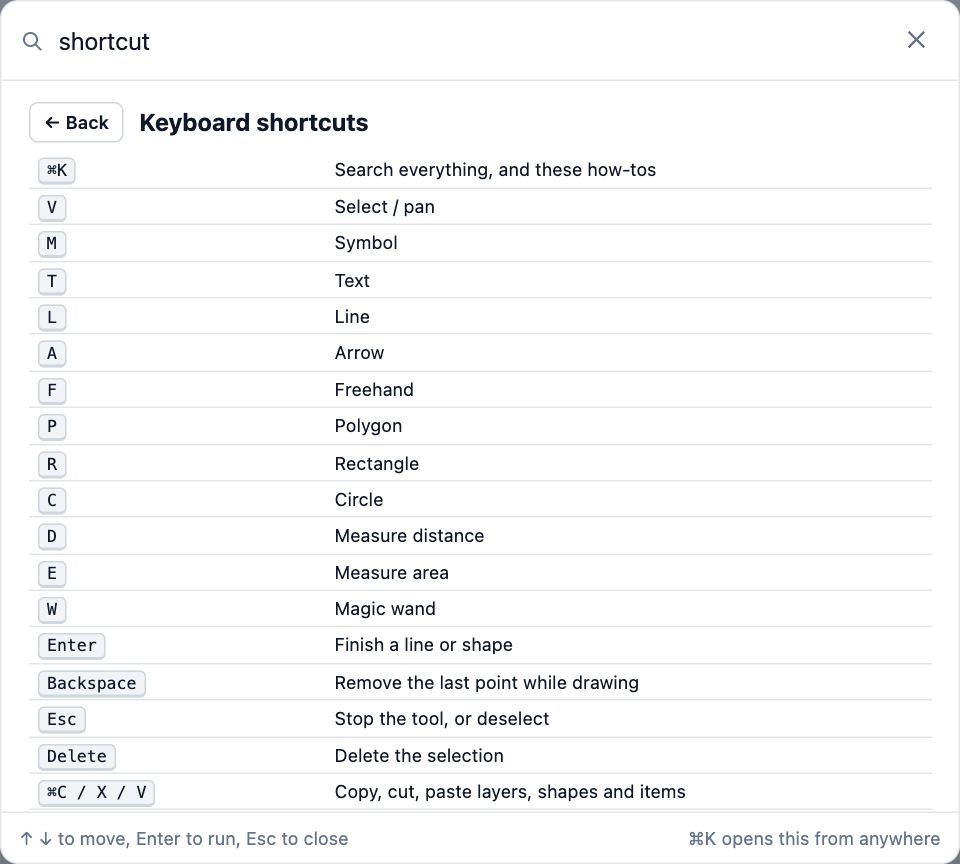
- Ctrl+K (Cmd+K on a Mac) searches everything. Ctrl+Z undoes, Ctrl+Shift+Z redoes, Ctrl+E opens Export.
- Tools have a letter: V select, R rectangle, L line, D measure distance, W magic wand. Enter finishes a shape, Backspace takes back the last point, Esc stops.
- Alt+1 to Alt+4 switch between the Site, Building, Capture and Documents workspaces. Shift+F is full screen.
- Drafting: / types a command, F3 snaps, F8 ortho, F10 polar, F11 tracking.
- In the 3D view, click in it first. Then W A S D walk, Shift runs, C crouches and Esc gives the pointer back. On the Showroom tour, [ and ] step between stops.
Tips
- Hover over a button to see its key in brackets, such as Rectangle (R).
- On a Mac, Ctrl in these shortcuts is Cmd.
Common mistakes
- Keys do nothing while the cursor is in a text box: click on the map first, then press the key.
- On a Mac, F11 shows the desktop: hold fn with it, or use the TRACK switch on the drafting bar.
Words in this lesson
- Workspace
- Site, Building, Capture or Documents in the top bar. A workspace changes which tools come first; it never hides anything in the project.
Related lessons
Find anything with searchFind any tool, task, Library item, setting or how-to by typing what you want.1 minDraft to exact sizes with the command lineDraw lines to exact lengths and angles with typed values, snaps and ortho, the way you would in CAD.4 minUndo, redo and go back in HistoryTake back a mistake, or return the project to an earlier point.2 min
Steps checked in the app on 14 October 2026.