
Learn · Everyday know-how · Lesson 4 of 6
Work without signal
You willGet a project ready for a site with no signal, work there, and let it sync when you are back.
Time3 min
Why it mattersBasements, rural blocks and plant rooms often have no signal. A little preparation means the work carries on.
Try it in Plotlay → Opens an example project with this lesson beside it. Nothing to install.
Steps
- Before you go, open Plotlay on the phone or tablet you will take. Projects, drawings, items and photos are kept on the device, so they open without signal.
- Choose the Map tab. Under Offline, choose Install the app (on iPhone or iPad: Share, then Add to Home Screen). The browser then keeps Plotlay’s data.
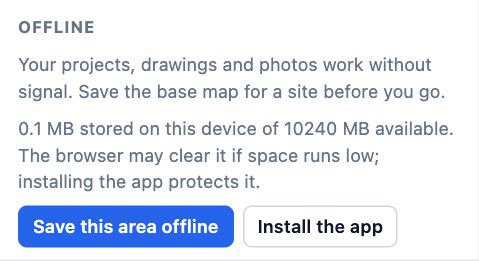
- Zoom to the site and choose Save this area offline for the base map (see the offline map lesson).
- Open each project you need once, and its 3D view if you will use it: the 3D viewer needs a connection the first time it opens.
- On site, work as usual. Signed in, the top bar says Offline, will sync, and your changes go to your account when signal returns.
Tips
- The Offline section says how much is stored on the device, and whether the browser has promised not to clear it.
- Map tiles you have already looked at are kept too, so panning round the site once before you leave helps.
Common mistakes
- Expecting sign in, sharing, scan requests, address search or the AI connector to work without signal: they need the internet and wait until you are back.
- Not installing on iPhone: Safari can clear data for a site not opened for a week. Add Plotlay to the Home Screen.
Words in this lesson
- Elevation and section
- An elevation is a side of the house, or a wall from inside, drawn straight on. A section is a cut through the building along a line you place.
- Connector (MCP)
- The way Claude and other AI agents work in your Plotlay projects as you, through the Model Context Protocol at app.plotlay.io/mcp.
Related lessons
Save a map area for offlineKeep the aerial for a site on your device, so the map shows without signal.3 minCapture a GPS point on siteSave a point where you stand, with its accuracy, time and a name.3 minWhere your data livesKnow what stays on your device, what goes to your account, how you sign in and how to cut off access.3 min
Steps checked in the app on 14 October 2026.