
Learn · Getting started · Lesson 4 of 8
Easy, Standard or Pro: how much shows
You willChoose how much of Plotlay is on screen, and get every tool back when you need it.
Time2 min
Why it mattersFewer buttons when you are starting out, every tool when you need it, and nothing locked either way.
Try it in Plotlay → Opens Plotlay with this lesson beside it. Nothing to install.
Steps
- The chip in the top bar names the level you are on. Choose it to open How much of Plotlay to show.
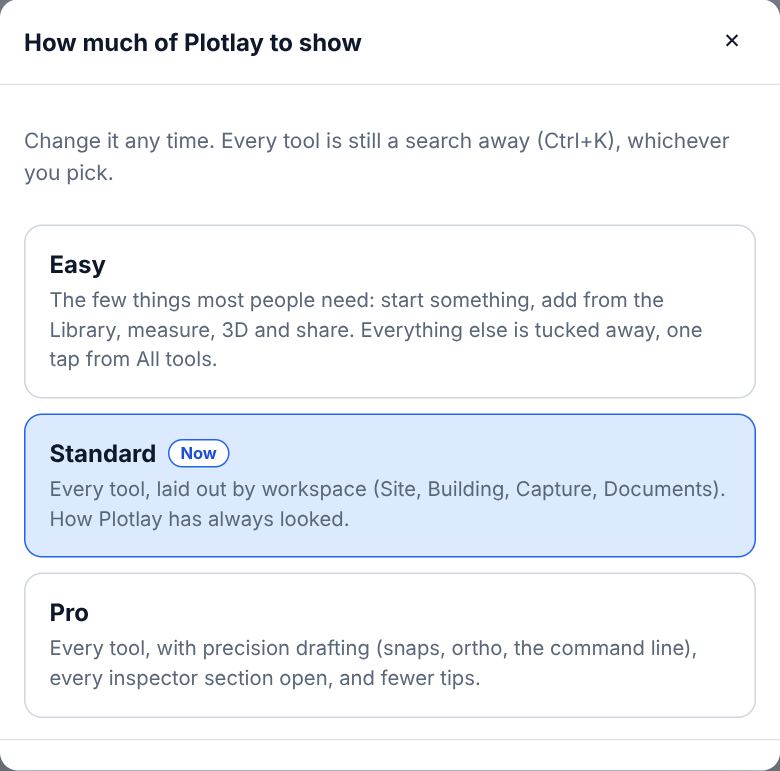
- Easy shows the few things most people need on a bar: start something, add from the Library, measure, 3D and share. Everything else is tucked away.
- Standard shows every tool, laid out by workspace (Site, Building, Capture, Documents), as Plotlay has always looked.
- Pro adds precision drafting (snaps, ortho and the command line) and opens every section of the inspector.
- On Easy, All tools on the bar switches to Standard, and the note it shows has Back to Easy.
- Nothing is locked at any level: Ctrl+K finds every tool. The choice is kept on this device.
Tips
- A link to a Quick start, or a first visit with no projects, starts on Easy; people already using Plotlay stay on Standard.
Common mistakes
- Thinking a tool was removed: it is on another level, or a search away with Ctrl+K.
Words in this lesson
- Workspace
- Site, Building, Capture or Documents in the top bar. A workspace changes which tools come first; it never hides anything in the project.
- Level
- A floor of the building, such as ground or upper. Each room, drawing and item sits on one level, and the plan shows one level at a time.
- Library
- Real-sized things to place, by category and subcategory: kitchen, bathroom, furniture, lighting, power, heating, stairs, outdoor, site, commercial, vehicles, plants. Search in your own words (GPO, countertop), filter, and star favourites.
- Elevation and section
- An elevation is a side of the house, or a wall from inside, drawn straight on. A section is a cut through the building along a line you place.
Related lessons
Find your way round the dashboardKnow where to start a job, continue a project, open an example or get help.1 minFind anything with searchFind any tool, task, Library item, setting or how-to by typing what you want.1 minMake something with Quick startGet a furnished room, a house, a garden or a car park in a few taps, then change it, see it in 3D and share it.3 min
Steps checked in the app on 22 October 2026.