
Learn · Designers and builders · Lesson 14 of 19
View, package and send several documents
You willLook at any document on your phone, then send several at once as one ZIP, an email or a link.
Time3 min
Why it mattersA client or builder usually needs the set, the renders and the schedules together, not one file at a time.
Try it in Plotlay → Opens an example project with this lesson beside it. Nothing to install.
Steps
- Choose Documents produced. Tap a document’s picture or title to view it: pinch to zoom, swipe for the next one. PDFs open page by page; a DXF or IFC says which app opens it.
- Choose Select, then tick the documents you want, or Select all. Search or pick a kind first to choose only what is shown.
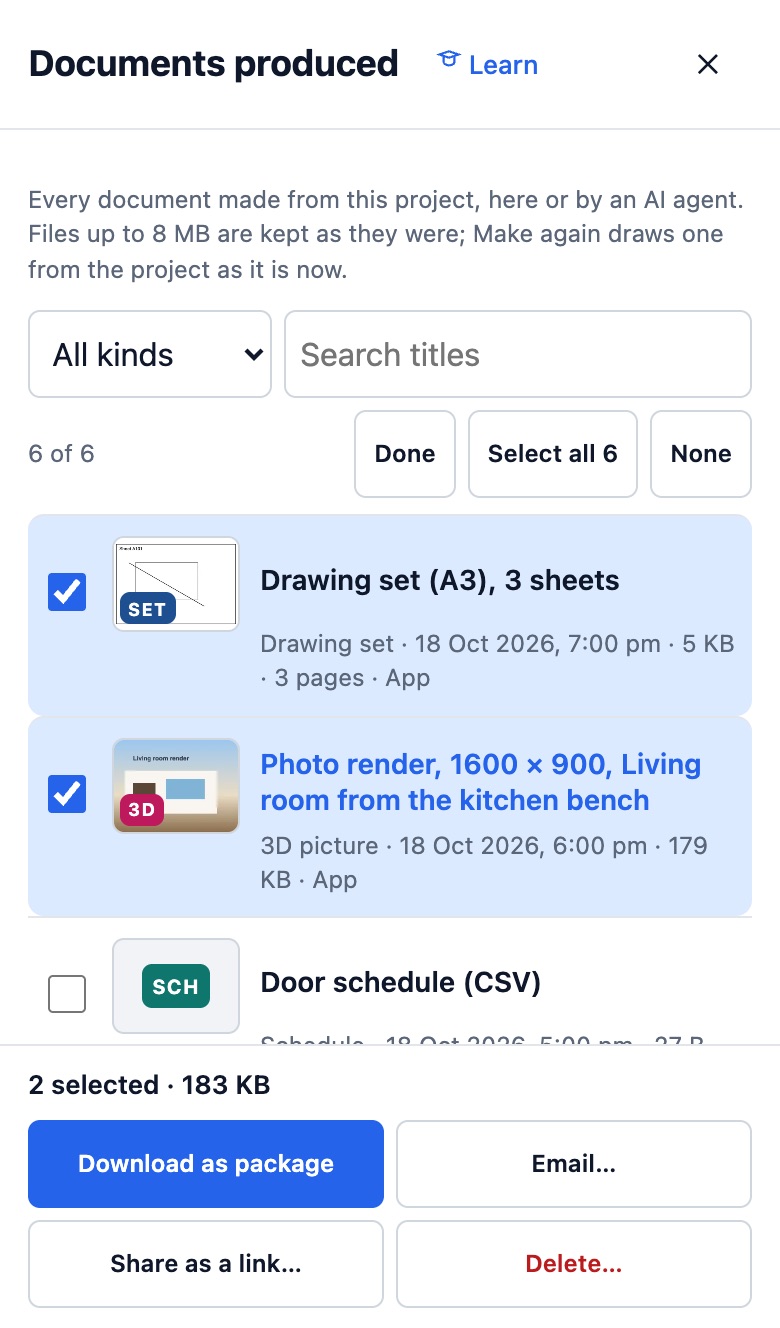
- Choose Download as package for one ZIP with a contents page (index.html). Documents that were not kept can be made again first, or are listed as not included.
- Choose Email… to send them to yourself, or to people you name with a short message. The dialog shows exactly who it goes to before you choose Send.
- Choose Share as a link… for a page listing them with a download for each and Download all. Copy, extend or turn it off under Package links.
Tips
- Files under 10 MB together are attached to the email; bigger ones go as a link that works for 7 days.
- Emails say “Sent via Plotlay by” you, and replies come to your own address.
- The AI connector can do the same: package_documents, email_documents and share_documents_link.
Common mistakes
- Emailing a large room pack and expecting an attachment: over 10 MB it arrives as a link.
- Forgetting a package link is still live: turn it off under Package links when the job is done.
Words in this lesson
- Room pack
- A PDF about chosen rooms: each plan at scale, every wall, views inside and the finish and fit-out schedules. Can show before and after side by side.
- Connector (MCP)
- The way Claude and other AI agents work in your Plotlay projects as you, through the Model Context Protocol at app.plotlay.io/mcp.
Related lessons
Save document settings and make them againKeep a room pack’s settings by name and make the same document again in one click after changes.3 minIssue a drawing setMake one numbered PDF of plans, elevations, 3D views and schedules with your title block.4 minMake a room packMake a PDF about chosen rooms: plans at scale, every wall, views inside and the finish and fit-out schedules.4 min
Steps checked in the app on 18 October 2026.