
Learn · Designers and builders · Lesson 16 of 17
Add a fireplace or heater
You willPlace a gas or wood fire, an open fireplace, a heater or a radiator, with its clearance zone, and switch it on in 3D.
Time4 min
Why it mattersA fire sets where the furniture goes, needs a flue and clearances, and is often what a client looks at first in 3D.
Try it in Plotlay → Opens an example project with this lesson beside it. Nothing to install.
Steps
- Open Library and choose Heating & cooling: Gas fires, Wood fires, Electric fires, Fireplaces and mantels, Heaters, Hydronic and underfloor or Outdoor heaters. Fire pits and outdoor fireplaces are under Outdoor living. Or search: wood heater, linear gas fire, potbelly, Victorian fireplace.
- Click an entry, then click the plan to place it. A built-in fire goes in a wall and the wall is cut for it; a see-through fire shows in the rooms on both sides. A freestanding heater stands on its hearth with its flue up through the ceiling.
- Select it and choose All details… under its name. Set its Type, and for a fire its fuel, media (logs, stones or crystals), surround, hearth and Flue, then Apply.
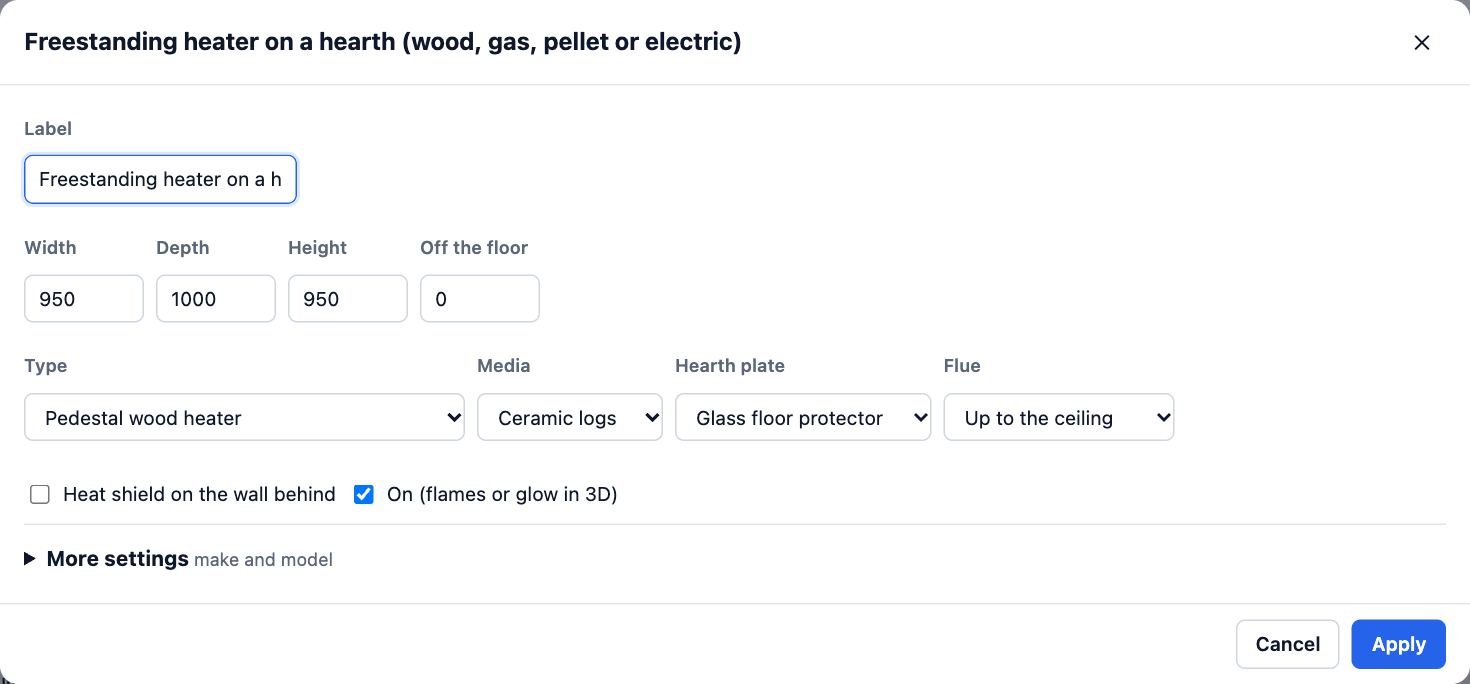
- The red dashed area round anything hot is its clearance to combustibles: on the plan only, with typical figures. Untick the entry’s clearance zone setting before you place it if you don’t want it.
- Choose 3D and click or tap a fire to turn it on or off: flames and a glow when it is on, the logs, stones or crystals when it is off. Heaters glow when on. On (flames or glow in 3D) in its settings sets how it starts.
- Open Schedules: each fire and heater is listed with its fuel, type, output, flue and clearance.
Tips
- Flames flicker on High and Ultra quality and stand still on Standard.
- Tick Save switched lights, fans and screens in the walk panel to keep a fire on or off in pictures and room packs.
- Old fireplaces: place a Victorian, Federation or Edwardian surround, then an insert for an existing fireplace inside it.
Common mistakes
- Treating the clearance zone as approval: the figures are typical and for reference only. Check AS/NZS 2918 (wood heaters), AS/NZS 5601.1 (gas) and the maker’s installation instructions.
- Placing a built-in fire in the middle of a room: click on or near the wall it goes in.
Words in this lesson
- Phase (existing, proposed, demolish)
- Whether something is there now and stays (existing), is new work (proposed) or is coming out (existing, to be removed). Plans, 3D and documents show Current, Proposed or Both from it.
- Library
- Real-sized things to place, by category and subcategory: kitchen, bathroom, furniture, lighting, power, heating, stairs, outdoor, site, commercial, vehicles, plants. Search in your own words (GPO, countertop), filter, and star favourites.
- Room pack
- A PDF about chosen rooms: each plan at scale, every wall, views inside and the finish and fit-out schedules. Can show before and after side by side.
- Schedule
- A table drawn from the plan: rooms and finishes, doors, windows, plants or materials. It updates as the plan changes and downloads as CSV.
Related lessons
Choose finishes and add fit-out to a roomSet a room’s floor tile and paint, and place a fitting such as a towel rail against a wall to the millimetre.5 minWalk through your plan in 3DTurn the plan into a 3D model, walk through it at eye height, tour the rooms, compare design options and save a picture.4 minRead and download the schedulesGet the room, finish, door and window schedules on screen, fill in finishes, and download them as CSV.3 min
Steps checked in the app on 18 October 2026.