
Learn · Clients and guests · Lesson 6 of 7
Share a tour of saved views
You willSend a project that opens at your first view, with the views you chose as a strip people tap or play.
Time4 min
Why it mattersA client sees the rooms in the order you meant, standing where you stood, with no 3D to learn.
You needA project with saved views (see Save views and play them as a tour), signed in to share it.
Try it in Plotlay → Opens an example project with this lesson beside it. Nothing to install.
Steps
- Save the views in the order you want them seen. In Views, the three dots, Move up or Move down change the order.
- Choose Share. Under Starting view, choose A saved view and pick the one they open at.
- Open Limit what they see or change. Under saved views in their Views list, choose All, Some (then tick the ones to show) or None. The starting view is always there.

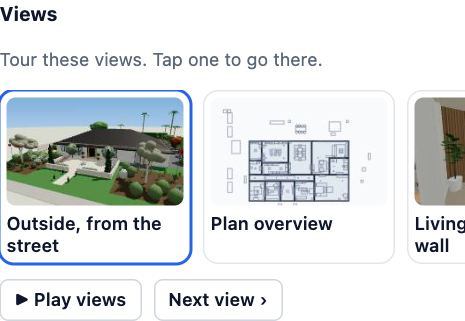
- Choose Preview what they see. The panel on the right has a Views strip: Tour these views. Tap one to go there. Play views steps through them and Next view goes on by one. Then Back to my project.
- Invite people or make a view link as usual. Beside a link, Link to a view copies a link that opens at one of the views it shows.
Tips
- A tap on a 3D or walk view opens the 3D view standing there, with the design options of that view applied.
- View links work with no account, so a client can take the tour on a phone before signing up.
- Change the order or a view later and everyone sees the new tour the next time they open it.
Common mistakes
- Choosing None and expecting the strip: with None they see only the starting view.
- Sending a link to a view that link doesn’t show: the link opens at its usual start instead. Choose the view from Link to a view beside that link.
Words in this lesson
- Design option
- One of two or more versions of part of a design, such as two vanities, kept in one project. Only the chosen option shows; clients can pick the one they like.
- View link
- A link anyone can open to look round a project without an account. It can end after 7 or 30 days, or never, and you can turn it off at any time. A link to a view opens it at one saved view.
- Starting view
- Where a guest or link starts (the whole project, some rooms, the 3D model, an option set or a document), what they can see and change, and a note for them.
- Client view
- The simple view a guest gets: the plan, a 3D walk-through, design options, the saved views to tour, quotes to accept, allowed documents and comments, with none of the editing tools.
Related lessons
Save views and play them as a tourSave the places to look from (plan, 3D or walking, with design options), play them as a tour, and share a link that opens at one.4 minSet where guests start and what they seeChoose where a guest or link opens, what they can see, what an editor may change, and the note they read.4 minOpen a project shared with youOpen a link or an invite, look round the plan and 3D, and know what a free account adds.3 min
Steps checked in the app on 18 October 2026.