
Learn · Clients and guests · Lesson 2 of 4
Comment and pick design options
You willPick the design option you prefer and leave comments pinned to the place they are about.
Time3 min
Why it mattersA comment pinned to the spot, and a recorded pick, beat a long email the designer has to decode.
You needA free Plotlay account, and a project shared with you as Can comment and pick options.
Try it in Plotlay → Opens an example project with this lesson beside it. Nothing to install.
Steps
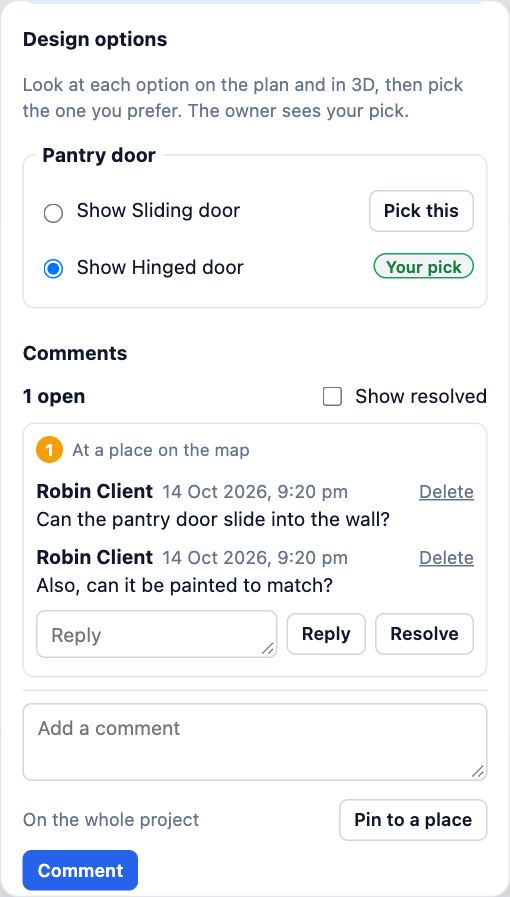
- Open the project. The panel beside the plan says what you can do, and lists the Design options and the Comments.
- Under Design options, choose Show beside each option to see it on the plan and in 3D. Then choose Pick this on the one you prefer: it shows Your pick, and the owner sees it.
- To comment, type in Add a comment, choose Pin to a place and click the spot on the plan, then choose Comment. A numbered pin marks it.
- To comment on a room or a fitting instead, click it on the plan first: the button then reads On and its name.
- Answer a comment with Reply. Choose Resolve when it is dealt with; Show resolved brings resolved comments back, with Reopen.
Tips
- Click a comment’s place line to fly the plan to the pin.
- Changed your mind? Choose Pick this on another option: your pick moves and the owner sees the new one.
Common mistakes
- Writing every point in one long comment: one comment per point, pinned where it applies, so each can be resolved on its own.
- Showing an option and thinking you picked it: Show changes only your own view. Only Pick this is recorded.
Words in this lesson
- Pin (control point)
- A pair of matching points, one on a drawing and one on the map, that places the drawing. Two pins place it; a third shows how well it fits.
- Design option
- One of two or more versions of part of a design, such as two vanities, kept in one project. Only the chosen option shows; clients can pick the one they like.
Related lessons
Open a project shared with youOpen a link or an invite, look round the plan and 3D, and know what a free account adds.3 minCompare design optionsKeep two versions of a room in one project and show one at a time.4 minShow a client the designInvite a client to look, walk through and comment, and see exactly what they will see before you send it.4 min
Steps checked in the app on 14 October 2026.