
Learn · Design codes and checks · Lesson 3 of 4
Make your own template with tolerances
You willTurn an estate’s guidelines, a by-law or a client brief into checks with limits, tolerances and warn bands.
Time5 min
Why it mattersRules that aren’t in any code, like an estate covenant or a client brief, are checked the same way as the code.
Try it in Plotlay → Opens an example project with this lesson beside it. Nothing to install.
Steps
- Choose Site, then Design codes. Under Make your own template, choose a starter such as Estate design guidelines, or Blank.
- Type a name, such as Seaview Estate design guidelines, and confirm. The template opens as a table with one rule on each row.
- Fill in each rule’s Value from your document, in the unit shown, such as 6000 mm for the house front setback. A rule left without a value reports UNKNOWN.
- Set a Tolerance to treat a small miss as WARN instead of FAIL, or Warn within to flag a pass that is close to the limit.
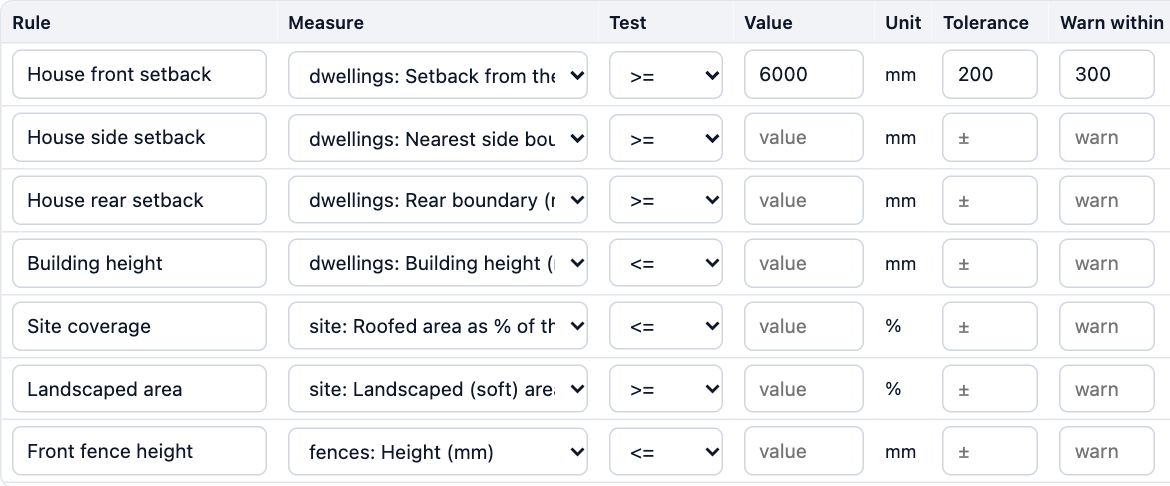
- Narrow a rule with Applies to, such as front=true for street fences, and add its Clause and a Note. Add a rule and Add a check by hand add rows.
- Choose Save. The template is listed under Used on this project, marked template, and the next check includes it.
Tips
- A template is your own list of checks, not an official code, and every report says so.
- Copy and change on a built-in code gives you an editable copy, for a local variation.
- Signed in, Save to library keeps a version of the template for your other projects, or your team’s.
Common mistakes
- Guessing a figure you haven’t got: leave the value empty, so the rule shows UNKNOWN until you have it.
- Typing metres into a millimetre rule: 6 is read as 6 mm. Check the Unit column.
- Closing the table with Cancel: nothing is kept. Choose Save.
Words in this lesson
- Library
- The shelves of real-sized things you can place: furniture, fit-out, appliances, plants, site items. Drag from the Library tab or search for it.
- Design code
- A set of planning or building rules for a place, such as a state’s planning code, built into Plotlay as a pack of checks. Choose the codes that apply to each project.
- Template (your own rules)
- A rule pack you make yourself, such as an estate’s design guidelines or a builder’s standards, with your own limits and tolerances. Save it to your library to use again.
- Tolerance
- How far a value may miss a rule’s limit and still show WARN rather than FAIL: a 6000 mm setback with a 200 mm tolerance accepts 5800 mm as WARN. A warn band does the reverse for a pass close to the limit.
Related lessons
Import a rule pack and review agent rulesBring in a pack as a JSON, YAML or CSV file or pasted text, and confirm rules an AI agent entered.4 minRun a check and read the resultsCheck the design against its codes and read each PASS, WARN, FAIL and UNKNOWN with its clause.4 minChoose the design codes for a projectPick the codes a project is checked against, from its address or by hand, and enter the facts they need.4 min
Steps checked in the app on 14 October 2026.