
Learn · Design codes and checks · Lesson 2 of 4
Run a check and read the results
You willCheck the design against its codes and read each PASS, WARN, FAIL and UNKNOWN with its clause.
Time4 min
Why it mattersIt shows what to fix or find out before a certifier asks. It is a reference, not an approval.
Try it in Plotlay → Opens an example project with this lesson beside it. Nothing to install.
Steps
- Choose the codes first (the lesson before this one). Then choose Site, then Compliance.
- Read the note at the top: Reference only. The rules are simplified from published sources and may be out of date. Verify with the current code and your council or certifier before relying on them.
- Codes used lists each pack with its version and any fact it still needs. Change opens Design codes.
- The summary counts the results. FAIL does not meet the rule. WARN passes close to the limit, or misses it by less than a set tolerance. UNKNOWN needs a measurement or a decision. PASS meets it.
- Go down the table: what Plotlay measured (Computed), the limit (Threshold), the clause (Code ref., linked to its source) and a note. Things a drawing can’t measure say Check by hand.
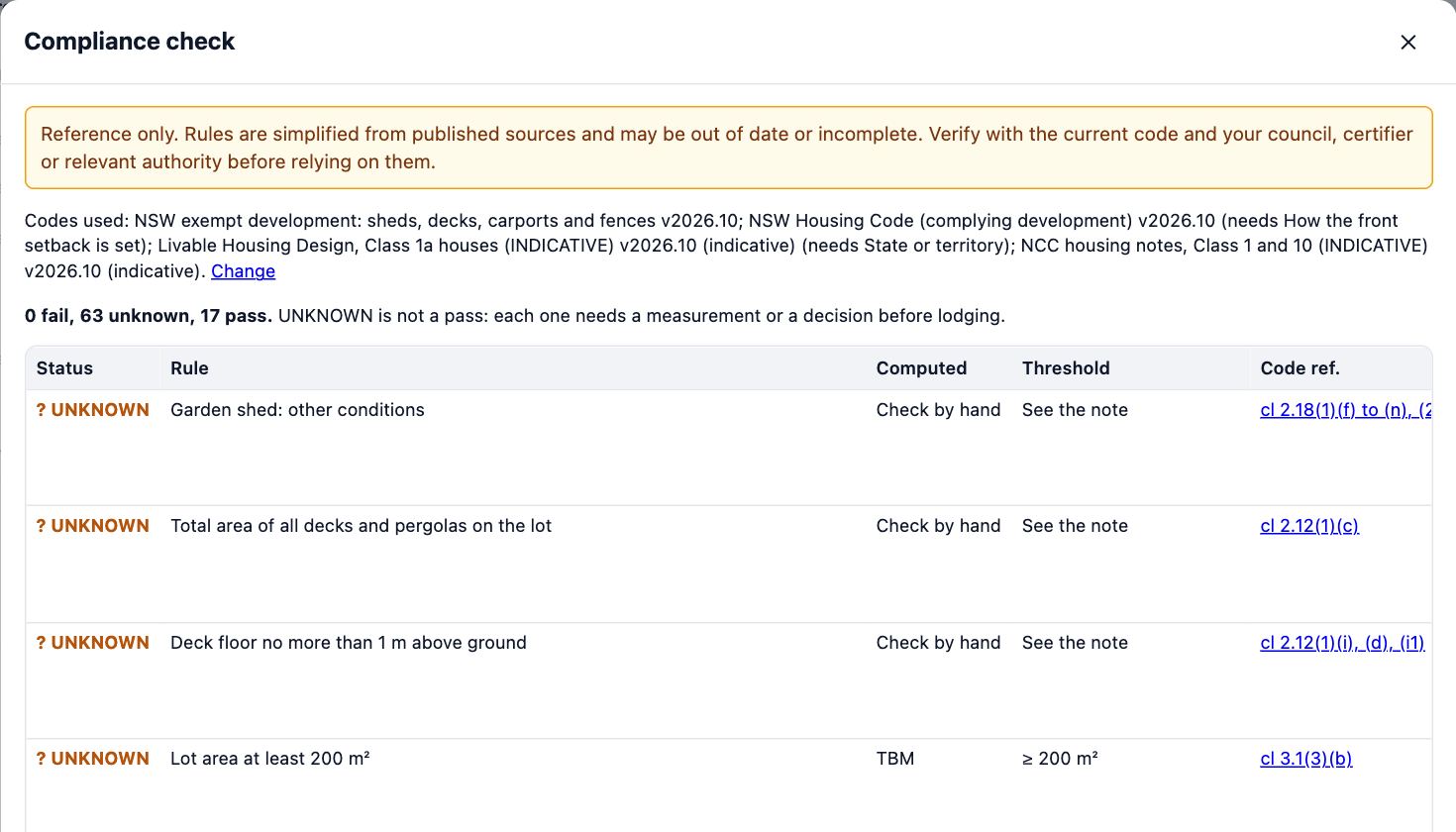
- Fill in what is missing with Site details… or Design codes… and check again. Make the summary PDF makes a sheet to lodge; As Markdown gives the table as text.
Tips
- The check reads the drawing as it is now. Run it again after every change.
- Only heights someone measured or typed count. A wall height the drawing assumed never passes a rule.
- The PDF and the Markdown both carry the reference-only note and the version of each pack used.
Common mistakes
- Reading UNKNOWN as a pass: it is a question still open, and the council or certifier will ask it.
- Treating PASS as approval: the check simplifies each rule. A certifier or council still assesses the design.
- Checking before the address and codes are set: the check then uses whatever codes the project started with.
Words in this lesson
- Design code
- A set of planning or building rules for a place, such as a state’s planning code, built into Plotlay as a pack of checks. Choose the codes that apply to each project.
- Tolerance
- How far a value may miss a rule’s limit and still show WARN rather than FAIL: a 6000 mm setback with a 200 mm tolerance accepts 5800 mm as WARN. A warn band does the reverse for a pass close to the limit.
- PASS, WARN, FAIL and UNKNOWN
- The results of a check. UNKNOWN is not a pass: Plotlay is missing a measurement or a fact to tell, and the note says which.
- Reference only
- Checks are simplified from published sources and may be out of date. Verify each rule with the current code and your council or certifier before relying on it; they decide.
Related lessons
Choose the design codes for a projectPick the codes a project is checked against, from its address or by hand, and enter the facts they need.4 minRun the compliance checkSee which planning rules the design passes, fails or can’t yet tell, and make the summary to lodge.4 minMake your own template with tolerancesTurn an estate’s guidelines, a by-law or a client brief into checks with limits, tolerances and warn bands.5 min
Steps checked in the app on 14 October 2026.