
Learn · Councils and development applications · Lesson 4 of 5
Run the compliance check
You willSee which planning rules the design passes, fails or can’t yet tell, and make the summary to lodge.
Time4 min
Try it in Plotlay → Opens an example project with this lesson beside it. Nothing to install.
Steps
- Fill in the site details first (the site lesson). Then choose Site, then Compliance.
- Read the summary at the top: the codes checked, then how many rules fail, are close to the limit, are unknown and pass.
- Go down the table. UNKNOWN is not a pass: each one needs a measurement or a decision. The Note says what is missing.
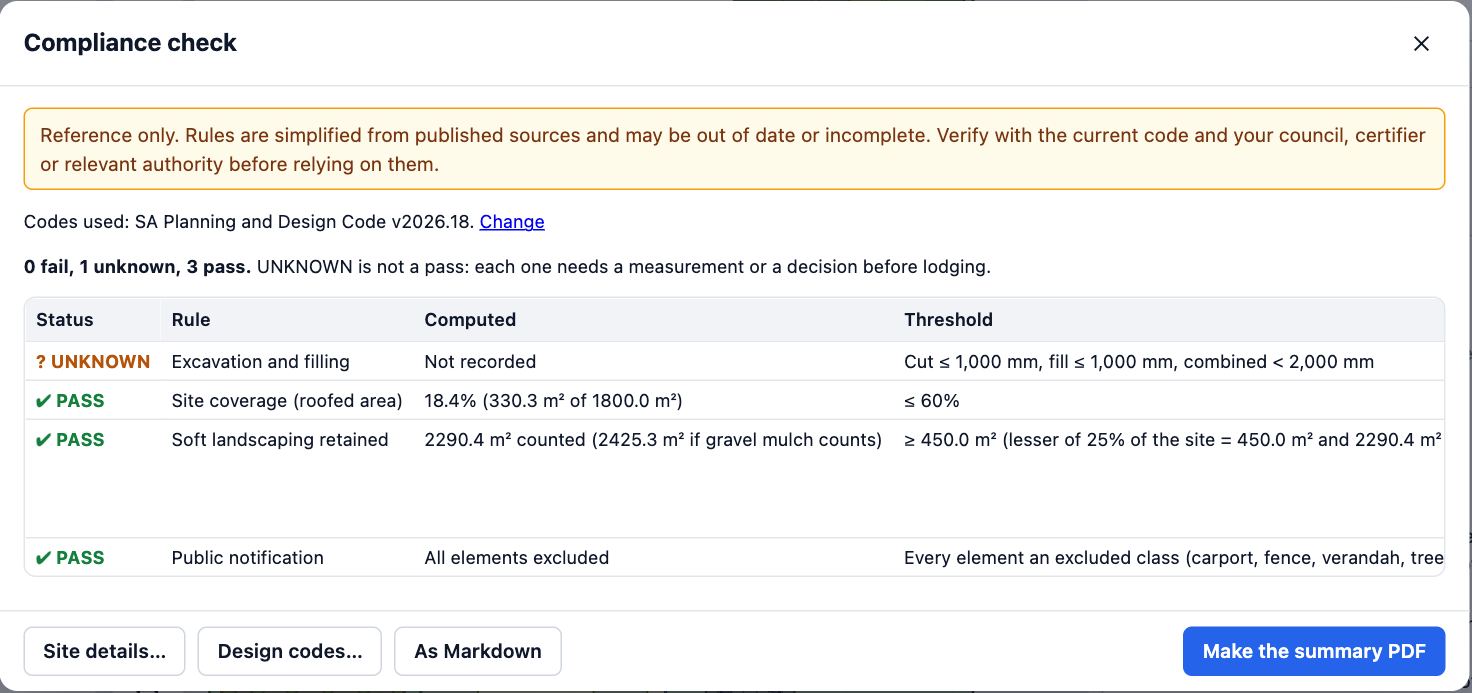
- Choose Site details… to fill in a missing fact, or Rules and tolerances… to add your own requirements, such as a builder’s or an owner’s.
- Choose Make the summary PDF for a compliance summary sheet to lodge, or As Markdown to paste the table elsewhere.
Tips
- The check reads the drawing as it is now, so run it again after each change.
- It checks the common residential rules; it doesn’t replace the council’s assessment.
Common mistakes
- Lodging with UNKNOWN rows left: each one is a question the council will ask.
- Forgetting the overlays: they add rules, such as for regulated trees.
Related lessons
Record the site and its boundaryEnter the address, zone, overlays, street boundary and survey facts the application is assessed on.3 minDimension the setbacksAdd a dimension from the house to each side of the site boundary, and read the distances.2 minMake the plans to lodgeProduce a numbered PDF set for a development application: compliance summary, site plan, elevations and schedules.4 min
Steps checked in the app on 14 October 2026.