
Learn · Councils and development applications · Lesson 5 of 5
Make the plans to lodge
You willProduce a numbered PDF set for a development application: compliance summary, site plan, elevations and schedules.
Time4 min
Try it in Plotlay → Opens an example project with this lesson beside it. Nothing to install.
Steps
- Fill in the site details first, so the set starts with the compliance summary. Then choose Documents, then Make a document.
- Choose Plans to lodge. The list shows the sheets this project can have, numbered: the cover, the compliance summary, then the plans, elevations, 3D views and schedules.
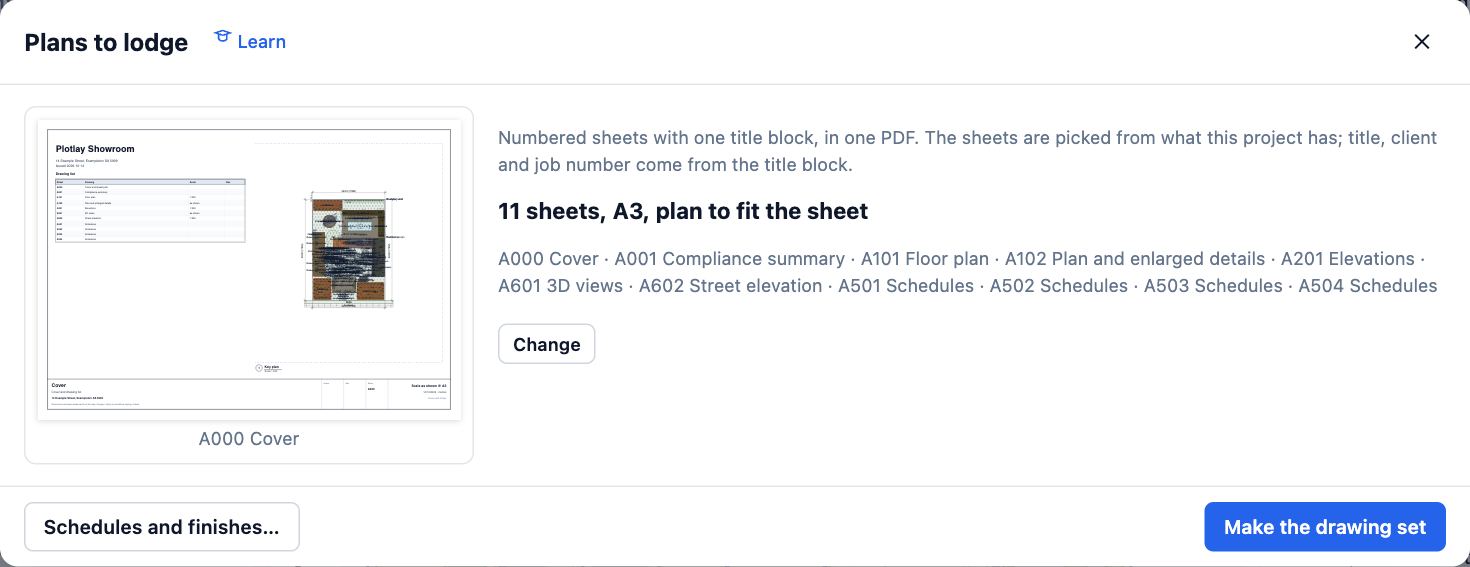
- Choose Change to set the Sheet size and the Plan scale, and to untick any sheet you don’t need.
- Choose Title block… to fill in the client, job number, drawn by and revision.
- Choose Make the drawing set. One PDF downloads and is kept under Documents produced, so you can download it again or make it again after changes.
Tips
- Check the set against the council’s lodgement checklist; some councils ask for a separate site management plan or a shadow diagram.
- Run the compliance check first and settle every UNKNOWN before making the set.
Common mistakes
- Making the set before the address and zone are in: it then has no compliance summary and the title blocks have no address.
- Issuing again without a new revision: choose Add revision so the sheets show what changed.
Related lessons
Run the compliance checkSee which planning rules the design passes, fails or can’t yet tell, and make the summary to lodge.4 minIssue a drawing setMake one numbered PDF of plans, elevations, 3D views and schedules with your title block.4 minDimension the setbacksAdd a dimension from the house to each side of the site boundary, and read the distances.2 min
Steps checked in the app on 14 October 2026.