
Learn · Teams and admins · Lesson 1 of 5
Set up a team
You willStart a Team plan, invite the people you work with, and put projects in the team space.
Time4 min
You needA Plotlay account (Sign in, top right). The Team plan is A$99 a month for 5 people.
Try it in Plotlay → Opens an example project with this lesson beside it. Nothing to install.
Steps
- Sign in, then choose Account (your initial, top right) to open Your account.
- Under Teams, choose See the Team plan. Set how many People (5 are included, each extra person is A$19 a month), then Start a team, name it and pay.

- Once the plan is active, the team shows under Teams in Your account with its seats, such as 3 of 5 seats.
- Type a teammate’s email, pick their role (Owner, Editor or Viewer) and choose Invite. Copy link sends the invite yourself; Cancel withdraws it.
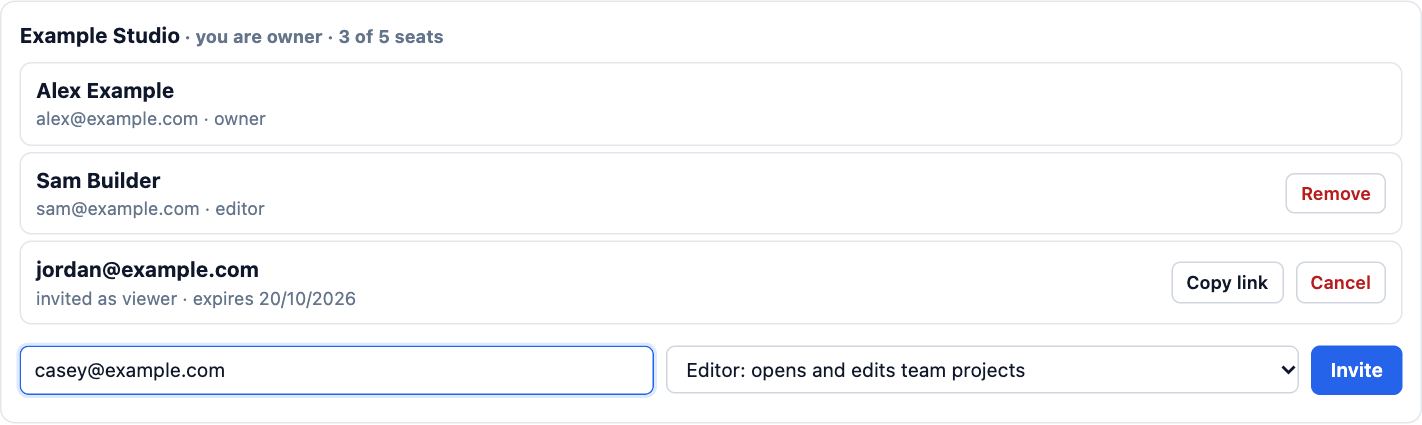
- Put a project in the team: open it, choose Share, and under Team space pick the team. Everyone in the team can then open it.
Tips
- Editors open and edit team projects; Viewers open them read-only; Owners also manage the team and billing.
- An invite counts against your seats until it is accepted or expires, so cancel ones you no longer need.
Common mistakes
- Inviting people before the plan is active: a team with no paid seats can’t invite anyone yet.
- Expecting teammates to see your other projects: only projects you put in the Team space are shared with the team.
Related lessons
Invite guests to a projectGive one person view, comment or edit access to a single project, and change or end it later.3 minPlans and limitsKnow what each plan includes, what sharing it pays for, and where to change plan.3 minShare a project with a linkSend a link that opens the project where you want, for as long as you choose.3 min
Steps checked in the app on 14 October 2026.