
Learn · AI connector · Lesson 2 of 4
Ask the connector for plans
You willWrite requests the connector carries out well, then check and adjust its work in the app.
Time4 min
You needA connected agent (see Connect Claude or another AI agent).
Try it in Plotlay → Opens Plotlay with this lesson beside it. Nothing to install.
Steps
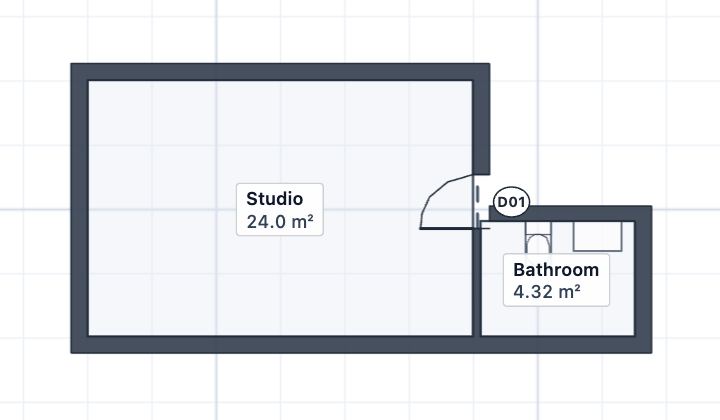
- Say which project, or ask for a new one: at an address, or a blank plan, such as “Start a plan called Granny flat and draw a 6 by 4 metre studio with a 2.4 by 1.8 metre bathroom beside it.”
- Give sizes in metres or millimetres and say which wall: “a door in the middle of the east wall of the studio”, “a vanity and a toilet on the back wall of the bathroom”.
- Ask for finished work by name: “the plan and elevations of the bathroom as a PDF”, “a room pack of the bathroom”, “check it against the Planning and Design Code”.
- Open the link it gives you, or the project under Your projects. What it draws is an ordinary project: select a room and change it by hand.
- Not what you wanted? Ask it to undo: it can take back its own changes for 7 days. Your own changes in the app go back with Undo and History.
- Ask it how to do something yourself (“how do I share this with my builder?”): its get_help tool answers with the lesson from this library.
Tips
- It works in metres east and north of where the project was made. Saying “the north wall” or “1.5 metres off the back fence” is clearer than “near the top”.
- Give it tape measurements you took on site and ask it to fit the plan to them; it reports measurements that can’t all be true instead of hiding them.
Common mistakes
- Asking for everything in one long message: go room by room and check each in the app.
- Giving a street address for a private drawing you don’t want on a map: ask for a blank plan instead.
Related lessons
Connect Claude or another AI agentLet Claude, or any agent that speaks MCP, work in your Plotlay projects as you, and disconnect it when you like.4 minWhat the connector can and can’t doKnow which jobs the connector does on its own and which need the app open.3 minDraw a room to sizeDraw a room by clicking its first corner and typing each wall length, then name it.3 min
Steps checked in the app on 14 October 2026.